
How to Hide Followers on Instagram for Maximum Privacy Guide
Learn simple steps to hide your followers on Instagram and boost your privacy with this easy, beginner-friendly guide.
Mike | 12 Dec 2025
Managing privacy on Instagram has become more important than ever. To keep your follower count private, stay professional, or protect your online space, hiding followers can help. It allows you to feel safer and more in control. This comprehensive guide explains how to hide followers on Instagram, the limitations, alternative solutions, and the most effective privacy settings to protect your account.
Understanding Instagram Follower Privacy
Instagram does not yet allow users to completely hide their followers list on public accounts. However, we can significantly limit who can see followers by adjusting account visibility, restricting user access, and modifying interaction settings.
Switch to a Private Account to Hide Followers
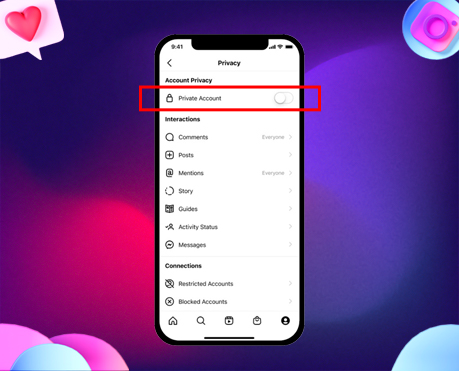
Making your Instagram account private is the most effective way to restrict access to your followers list. Only approved followers will be able to see your following and follower count.
Steps to Make Your Account Private
- Open Instagram and tap your profile icon.
- Click the top-right menu and go to Settings & Privacy.
- Select Account Privacy.
- Toggle Private Account ON.
Benefits of a Private Account
- Only accepted users can view followers.
- Blocks unknown users from accessing posts, reels, and stories.
- Provides full control over who enters your digital space.
Block or Restrict Users to Hide Your Followers from Specific People
If you do not want to make your entire account private, you can still hide followers from certain individuals.
1. Blocking a User
Blocking removes them from your followers and following lists completely.
- Go to the person’s profile
- Tap ⋮ (three dots)
- Select Block
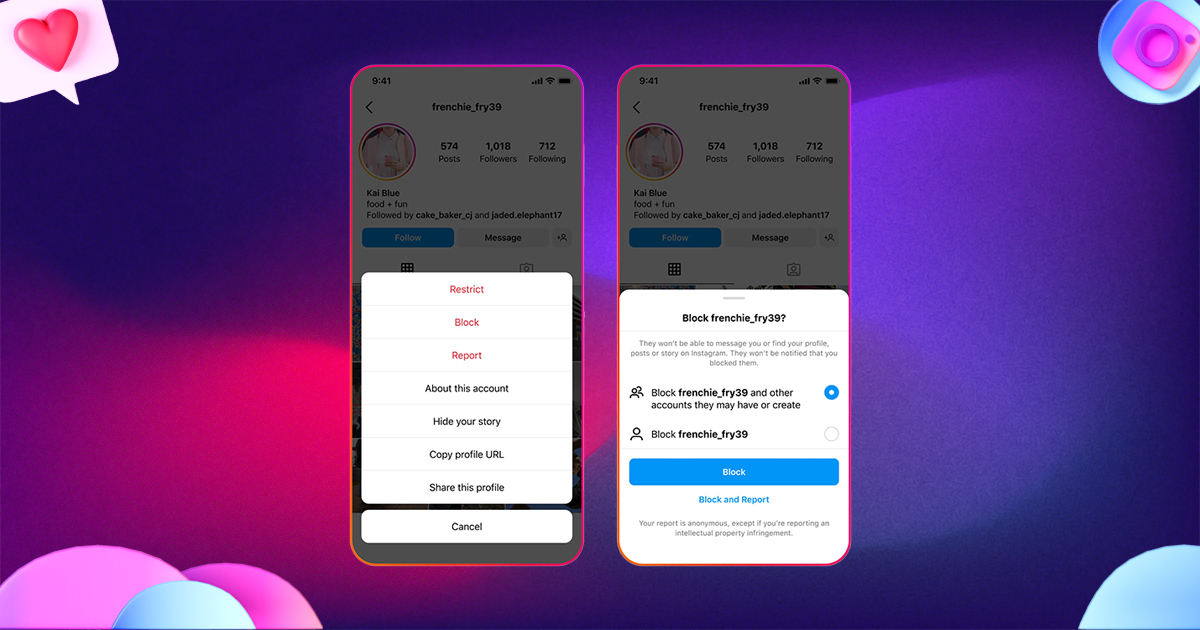
Blocked users cannot:
- See your profile
- View your followers
- Search your account
- Send messages
2. Restricting a User
Restricting is a silent privacy tool. Restricted users cannot see your activity status or when you read messages. While they can technically see your followers, they lose major engagement privileges.
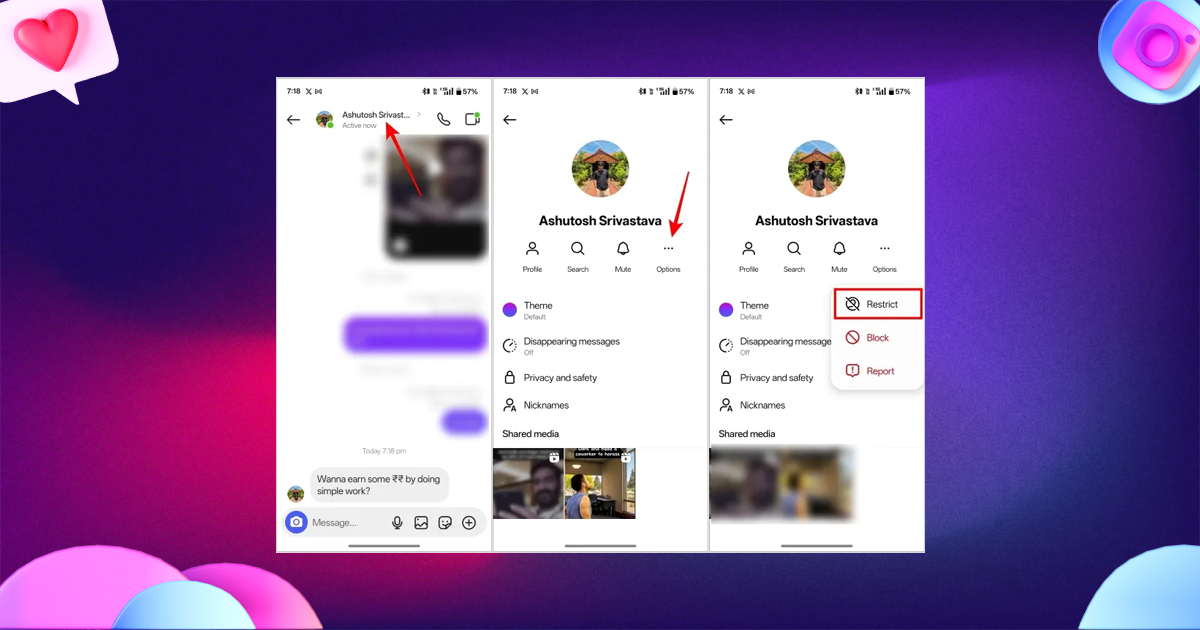
Steps:
- Open a user’s profile
- Tap ⋮
- Choose Restrict
Remove Followers Without Blocking Them
If your account is private, you can remove followers silently.
How to Remove Followers
- Go to your follower list.
- Tap Remove next to the user you want to remove.
- They will not be notified.
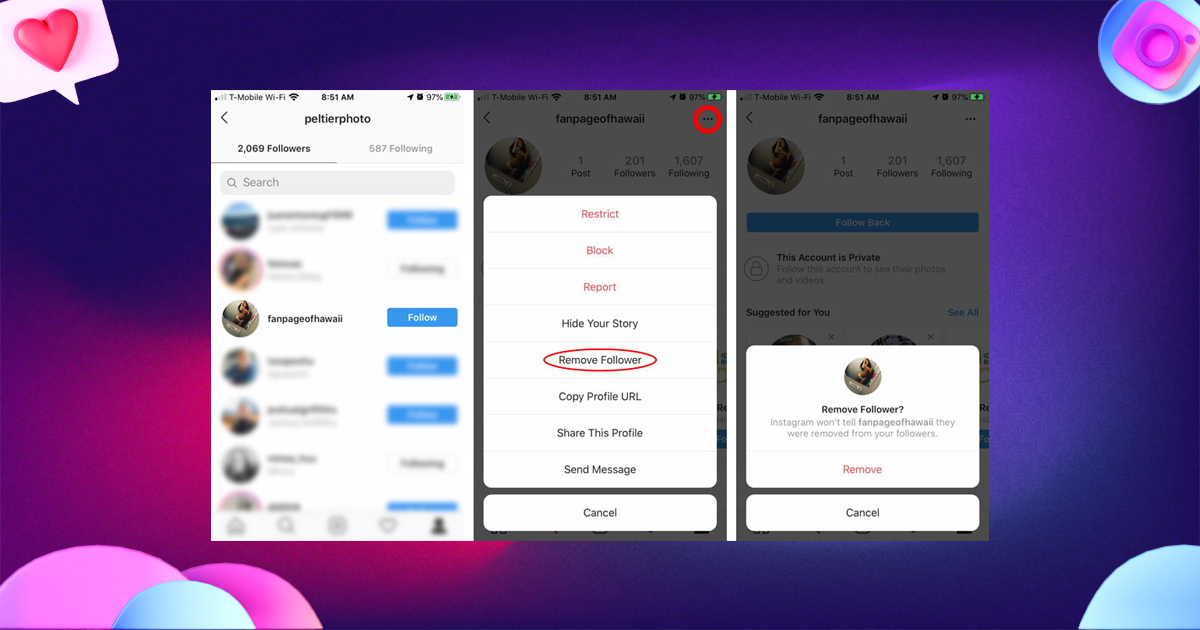
This keeps your account private and avoids unnecessary conflict.
Hide Followers by Switching to a Professional Account
A professional account (Creator or Business) offers more profile controls and insights but still does not hide followers completely. However, it allows better control over messaging, commenting, and audience segmentation.
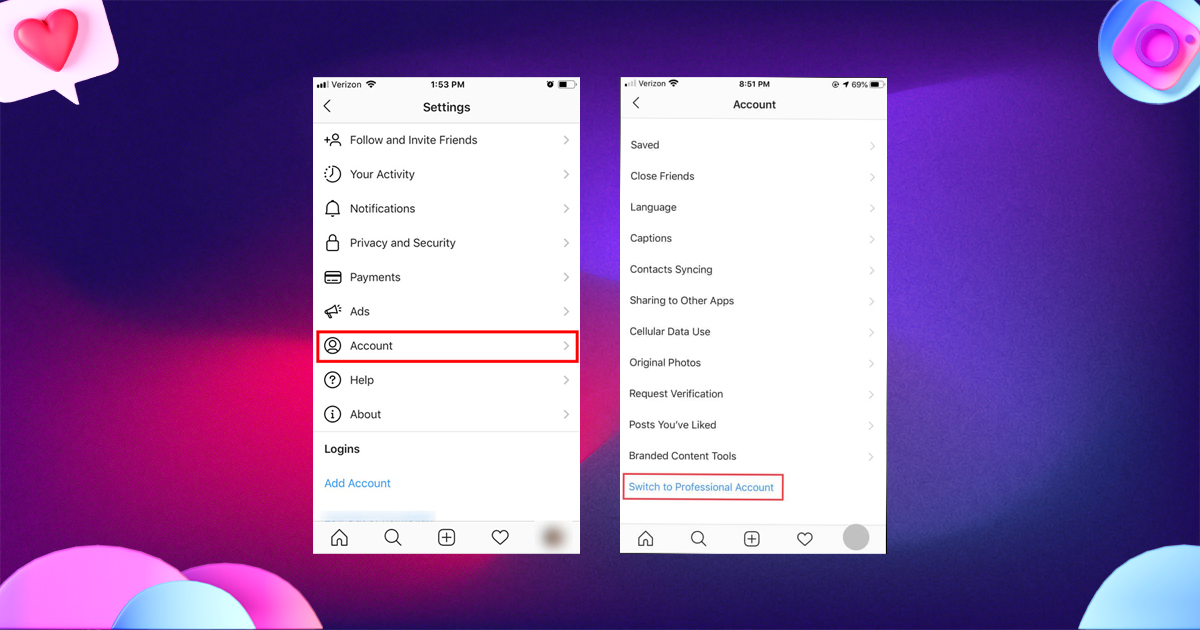
When a Professional Account Helps
- For creators who want cleaner, safer engagement.
- For brands managing multiple interactions.
- For influencer accounts that aim to filter unwanted users.
But note: follower lists remain visible unless your account is private
Limit Who Can See Your Activity on Instagram
Hiding followers also includes reducing signals about your online presence.
Disable Activity Status
- Go to Settings & Privacy
- Select Messages & Story Replies
- Turn off Show Activity Status
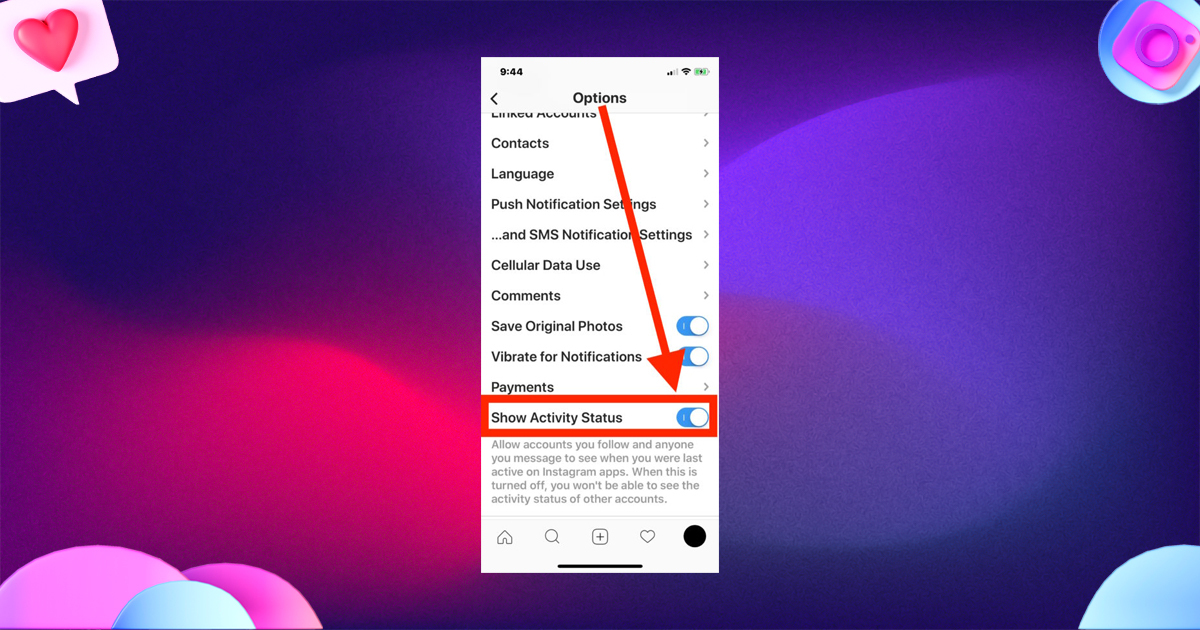
This ensures no one can see when you are online or active.
Restrict Who Can See Your Following Activity
Instagram no longer shows “Following Activity” publicly, which means:
- Users cannot see what posts you like.
- They cannot track your interactions on other pages.
This indirectly protects your follower relationships.
Use Close Friends to Control Your Audience
Close Friends helps you share selected stories with a small audience.
Although it does not hide followers, it gives additional privacy around content visibility.
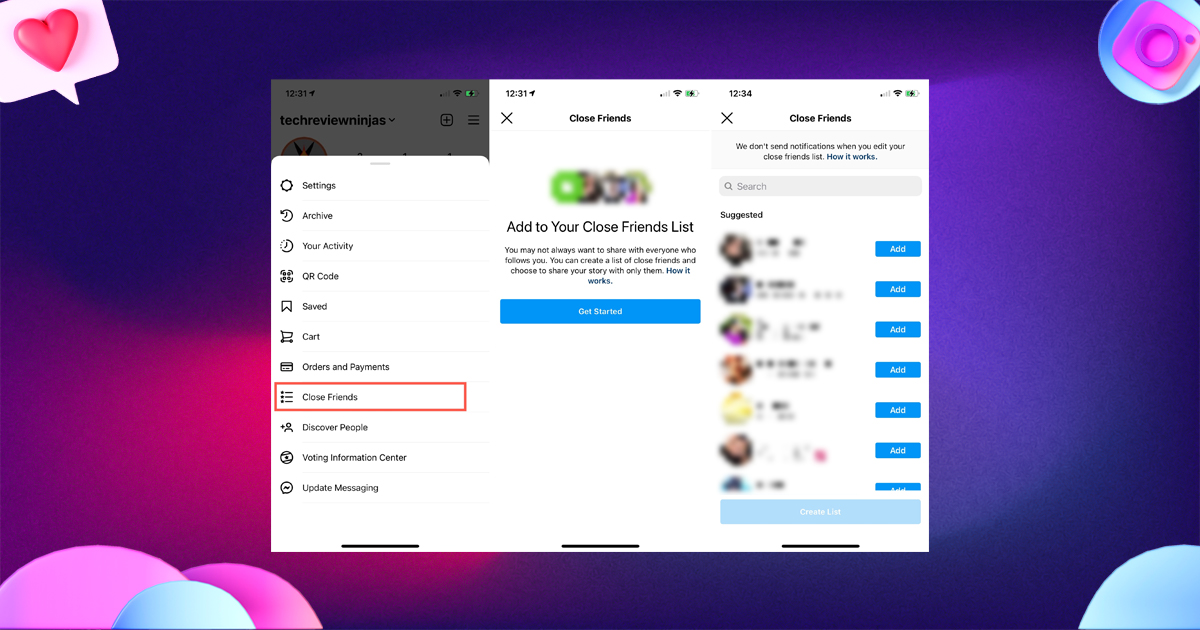
Steps
- Add people to Close Friends
- Share stories only with this list
A perfect method to manage visibility without altering your full profile.
Prevent Unknown Users from Contacting You
Modify Your Messaging Settings
- Go to Settings & Privacy
- Select Messages & Story Replies
- Change message request settings to:
- Your followers on Instagram → Don’t Receive Requests
- Others on Instagram → Don’t Receive Requests
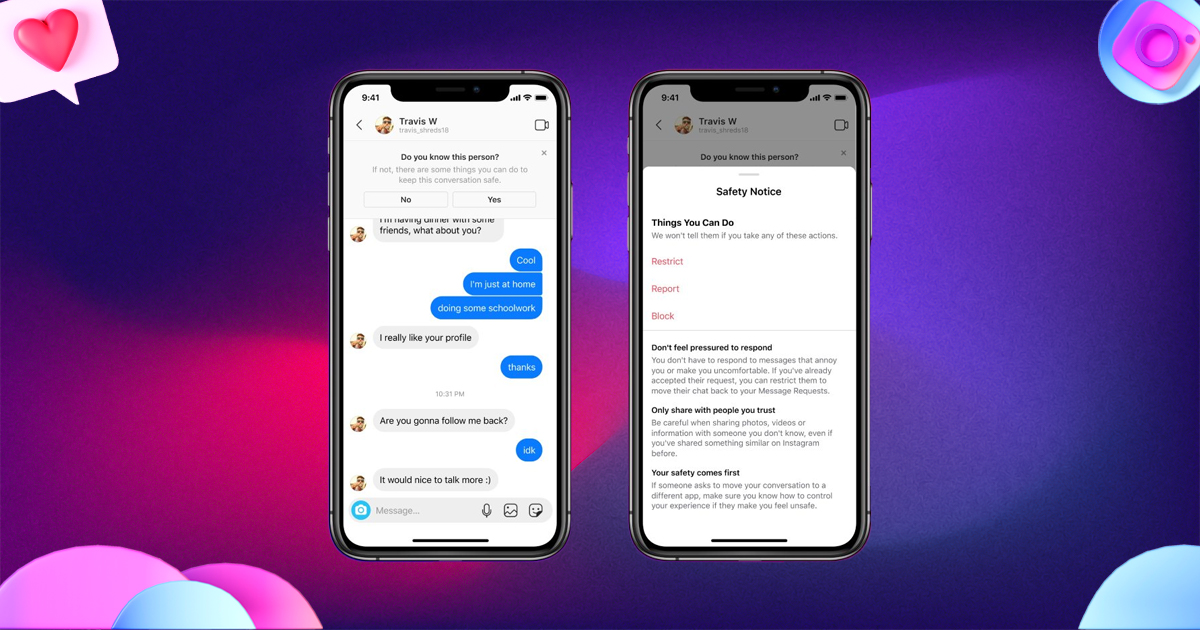
This keeps your account cleaner and reduces unwanted interactions.
Use Account Restriction Tools for More Privacy Control
Instagram offers advanced restriction tools:
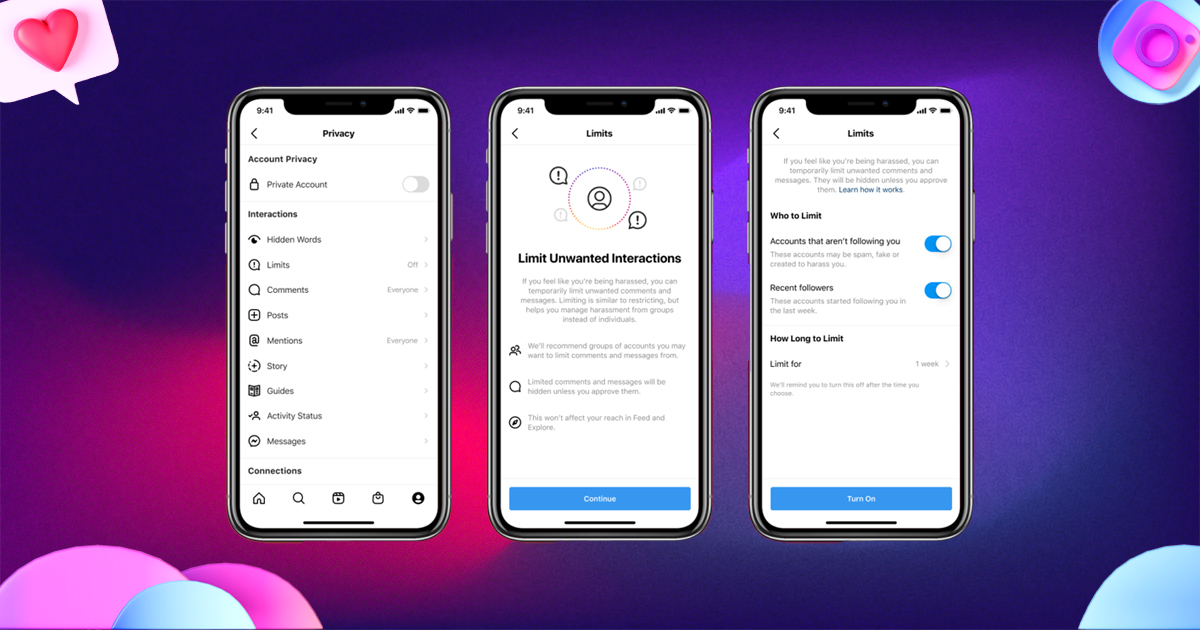
1. Limit Unwanted Interactions
You can temporarily limit comments and messages from:
- Non-followers
- Recent followers
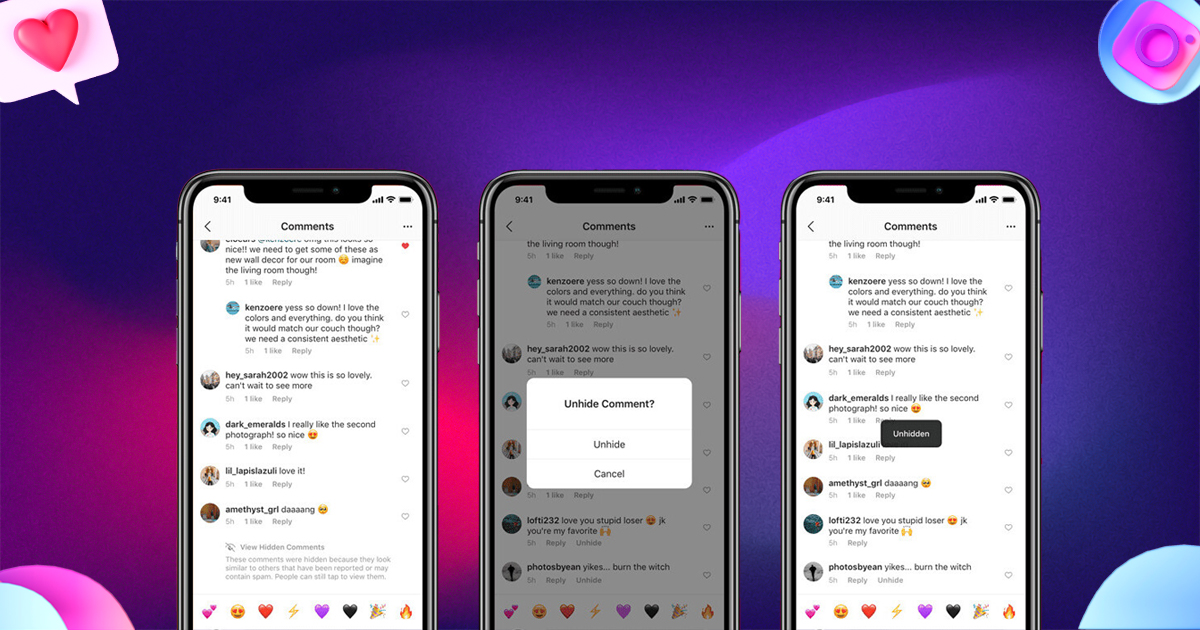
2. Hide Offensive Comments
Enable AI-based comment filtering:
- Settings → Privacy → Hidden Words
- Turn on Hide Comments
- Turn on Advanced Comment Filtering
Create a Follower-Free Second Account (Backup Account)
Many users prefer creating a “public version” of their profile with minimal followers for brand visibility and keeping their main account private for personal use.
This method helps you:
- Separate personal and professional content
- Maintain complete privacy
- Avoid unwanted online attention
Advanced Tips to Protect Your Instagram Privacy
1. Hide Your Followers from Search Engines
- Turn off Similar Account Suggestions
- Disable contact syncing
- Avoid linking Instagram to other social media accounts
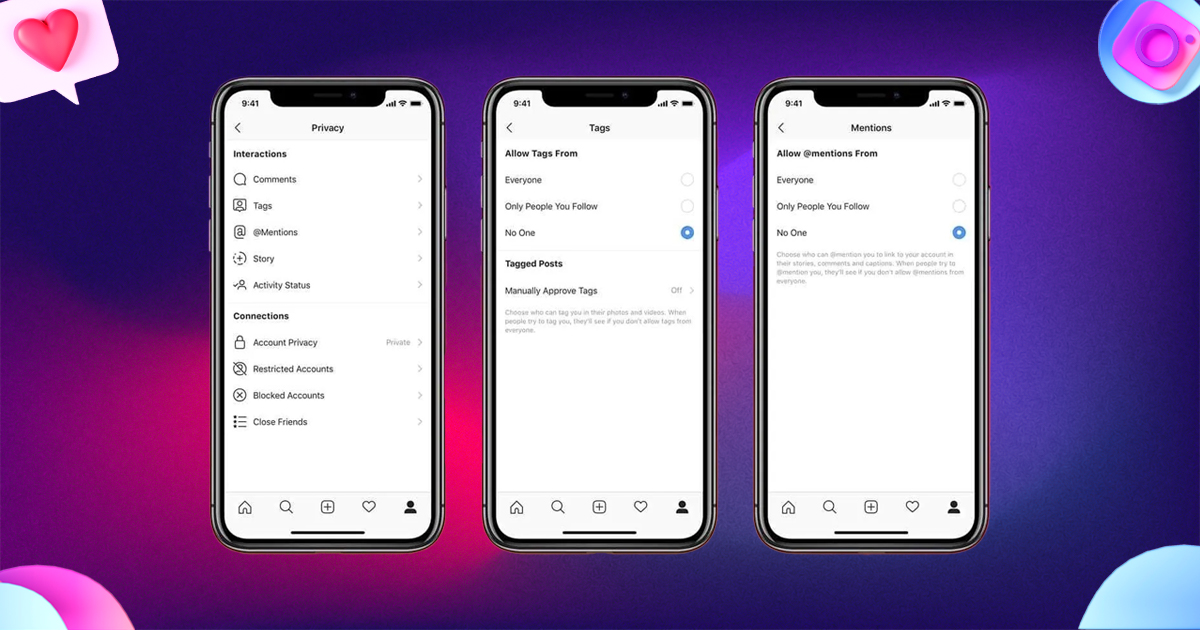
2. Avoid Public Tags and Mentions
- Restrict who can tag you
- Approve tags manually
3. Turn Off Story Sharing
Stop others from resharing your stories or posts.
Final Thoughts
Hiding followers on Instagram is possible through smart privacy management even though the platform does not offer a direct “hide followers” button. By using private mode, restricting users, modifying interaction settings, and strengthening account controls, you can build a safer and more private Instagram experience.
If you follow the strategies shared above, you can confidently protect your profile and maintain complete control over your digital environment.
FAQs
1. Can you completely hide followers on a public Instagram account?
No. Instagram does not allow full follower list hiding on public accounts.
2. Can you hide specific followers?
Yes. You can remove, block, or restrict them.
3. Does switching to a private account hide followers?
It hides followers from all non-approved users.
4. Can business accounts hide followers?
No. Follower lists remain visible unless the account is private.
Leave A Comment