
Add White Background to Photo Online Guide
Learn how to add white background to photo online easily. Get clean, professional images with simple tools and step-by-step tips.
Kasthuri| 24 Mar 2026

In today’s visually driven digital world, clean and professional product images are essential for branding, marketing, and conversions. One of the most effective ways to enhance image quality is to add white background to photos online. Whether you are an eCommerce seller, social media manager, or digital marketer, achieving a crisp white background can instantly elevate your visuals and make them more appealing.
In this comprehensive guide, we explain how to add white backgrounds to photos online, explore the best tools, and provide expert techniques to ensure your images look flawless and conversion-ready.

Why White Backgrounds Matter for Your Photos
A white background is not just about aesthetics—it plays a crucial role in professional presentation and performance.
- Enhances product visibility by removing distractions
- Creates a clean and minimal look suitable for websites and catalogs
- Meets marketplace standards (like Amazon and eBay)
- Improves focus on the subject
- Boosts conversion rates by making images look trustworthy
When we use white backgrounds, we ensure that the subject stands out sharply, helping viewers focus on the details that matter.
Best Methods to Add White Backgrounds to Photos Online
There are multiple ways to achieve a white background using online tools. Each method varies in complexity and precision.
1. Automatic Background Removal Tools
Modern AI-powered tools make it easy to remove backgrounds instantly and replace them with white.
Steps to follow:
- Upload your image to an online editor
- Use the background remover tool
- Replace the removed background with white
- Download the final image

These tools use advanced AI algorithms to detect edges and isolate the subject accurately.
2. Manual Editing for Precision
For images requiring more control, manual editing tools offer detailed customization.
Key steps:
- Use selection tools like lasso or pen tool
- Carefully outline the subject
- Remove the original background
- Add a pure white layer (#FFFFFF) behind the subject
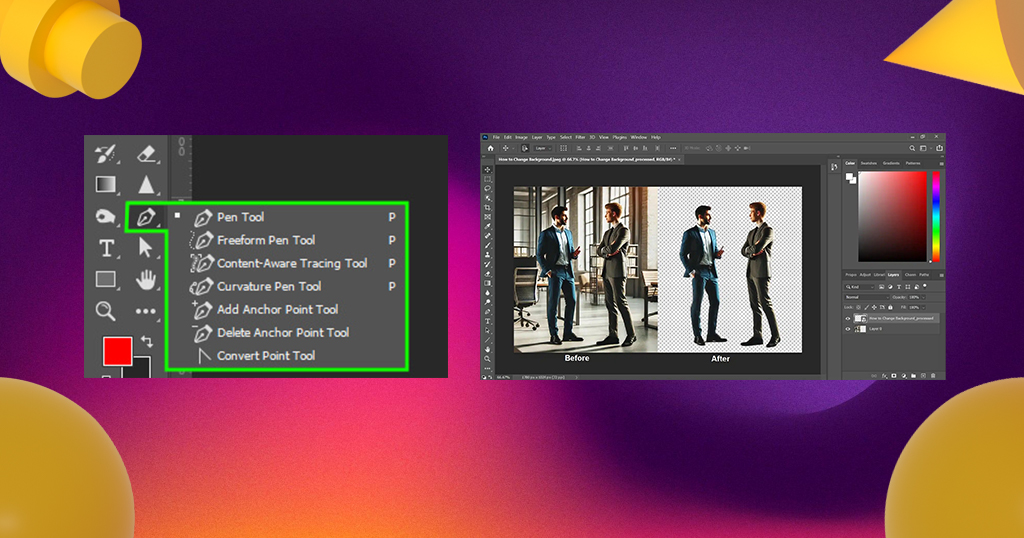
Manual editing ensures pixel-perfect accuracy, especially for complex images like hair, shadows, or transparent objects.
3. Mobile Apps for Quick Edits
Mobile applications allow you to edit photos on the go.
Benefits:
- Easy to use interface
- Quick background replacement
- Ideal for social media content

These apps are perfect for quick edits without needing advanced software skills.
Top Online Tools to Add White Backgrounds
Choosing the right tool can significantly impact the quality of your final image.
Popular Tools Include:
- Remove.bg – Fast and accurate AI background removal
- Canva – Beginner-friendly design platform with background editing
- PhotoRoom – Ideal for eCommerce product images

- Fotor – Advanced editing features with background replacement
- Pixlr – Lightweight yet powerful online editor

Each tool offers unique features, but all allow you to replace backgrounds with pure white efficiently.
Step-by-Step Process for Perfect White Background Images
To achieve professional results, we follow a structured approach:
Step 1: Choose a High-Quality Image
Start with a high-resolution image to avoid pixelation during editing.
Step 2: Remove the Background
Use an AI tool or manual selection to isolate the subject.
Step 3: Add a White Background
Insert a solid white layer (#FFFFFF) behind the subject.
Step 4: Adjust Edges
Refine edges to remove rough or jagged outlines.
Step 5: Add Shadows (Optional)
Subtle shadows create a natural and realistic effect.
Step 6: Export in High Resolution
Save the image in PNG or JPEG format with maximum quality.

Advanced Techniques for Professional Results
To stand out from competitors, we apply advanced editing techniques:
1. Edge Refinement
Smooth edges using feathering tools to avoid harsh cutouts.
2. Color Correction
Adjust brightness, contrast, and saturation to match the white background.
3. Shadow Creation
Add soft drop shadows to maintain depth and realism.
4. Reflection Effects
For premium visuals, include subtle reflections beneath the product.
Common Mistakes to Avoid
Even small errors can reduce image quality. Avoid these pitfalls:
- Using off-white or gray backgrounds instead of pure white
- Leaving rough or jagged edges around the subject
- Over-editing brightness, causing washed-out images
- Ignoring shadows, making images look unnatural
- Exporting in low resolution
By avoiding these mistakes, we ensure clean, high-quality visuals.
Best Practices for eCommerce Images
If you are selling products online, white backgrounds are often mandatory.
Key guidelines:
- Use pure white (#FFFFFF) background
- Maintain consistent image size and alignment
- Keep the subject centered
- Ensure proper lighting and clarity
- Use multiple angles for better product visibility
These practices help improve customer trust and product appeal.
Benefits of Using Online Tools Instead of Software
Online tools offer several advantages over traditional software:
- No installation required
- User-friendly interfaces
- Quick processing with AI automation
- Accessible from any device
- Cost-effective solutions
We can achieve professional results without advanced technical skills using these tools.
White Background vs Transparent Background
Understanding the difference helps choose the right format:
| Feature | White Background | Transparent Background |
|---|---|---|
| Usage | e-commerce, catalogs | Logos, design overlays |
| Appearance | Clean and solid | No background |
| File Type | JPEG/PNG | PNG |
| Flexibility | Fixed | Highly flexible |
For most product listings, a white background is the preferred choice.
SEO Benefits of White Background Images
Optimized images contribute to better search rankings.
How white backgrounds help SEO:
- Improve image clarity and user engagement
- Increase click-through rates
- Enhance page loading speed
- Support Google image indexing
When we use clean white backgrounds, our images become more search-engine friendly and visually appealing.
Use Cases Across Industries
White background images are widely used across different sectors:
eCommerce
Product listings on platforms like Amazon and Shopify
Fashion
Clothing catalogs and model photography
Food Industry
Menu displays and promotional images
Corporate
Professional headshots and branding materials
Social Media
Clean, aesthetic posts for better engagement
How to Maintain Consistency Across Images
Consistency is key for branding and professionalism.
Tips for uniformity:
- Use the same background color code (#FFFFFF)
- Maintain consistent lighting and angles
- Standardize image dimensions
- Apply identical editing settings
This creates a cohesive and professional visual identity.
Future of Background Editing with AI
AI technology continues to evolve, making image editing faster and more accurate.
Emerging trends:
- Real-time background removal
- Automatic shadow generation
- AI-powered image enhancement
- One-click professional editing
We can expect even more efficient and precise tools in the near future.
Conclusion
Adding white backgrounds to photos online is a powerful technique for improving image quality, enhancing visual appeal, and boosting conversions. With the right tools and techniques, we can create clean, professional, and high-performing images that stand out in competitive markets.
By following structured steps, avoiding common mistakes, and applying advanced editing techniques, we ensure every image meets professional standards and delivers maximum impact.
Get started today and transform your photos into clean, professional visuals that drive results.






Leave A Comment