
How to Go Live on TikTok: Complete Step-by-Step Guide for 2026
Learn how to go live on TikTok in 2026 with an easy step-by-step guide. Start streaming, connect with followers, and grow your audience.
Kasthuri| 05 Feb 2026
TikTok Live has become one of the most powerful tools for creators, brands, and businesses to connect with audiences in real time. We understand that many users want clear, practical instructions on how to go live on TikTok without confusion. In this comprehensive guide, we provide everything you need to know—from eligibility requirements to advanced streaming tips.
What Is TikTok Live and Why It Matters
TikTok Live is a built-in streaming feature that allows users to broadcast video content instantly to their followers. Unlike regular TikTok posts, live streams enable real-time interaction through comments, reactions, and virtual gifts.
We recognize that TikTok Live is important because it helps creators:
- Build stronger relationships with followers
- Increase account visibility
- Boost engagement rates
- Earn money through gifts
- Showcase products and services
- Create authentic, unedited content
Live streaming on TikTok is now a key strategy for digital growth.
TikTok Live Requirements: Who Can Go Live
Before starting a live stream, we must ensure that basic eligibility criteria are met.
Minimum Requirements to Go Live on TikTok
To access the TikTok Live feature, the account must meet these conditions:
- At least 1,000 followers
- User must be 16 years or older
- Account must follow TikTok community guidelines
- The app must be updated to the latest version
To receive virtual gifts and monetize streams, the user must be 18 years or older.
If these requirements are not fulfilled, the Live option will not appear.
Step-by-Step Instructions to Go Live on TikTok
We now explain the exact method to start a TikTok Live session quickly and correctly.
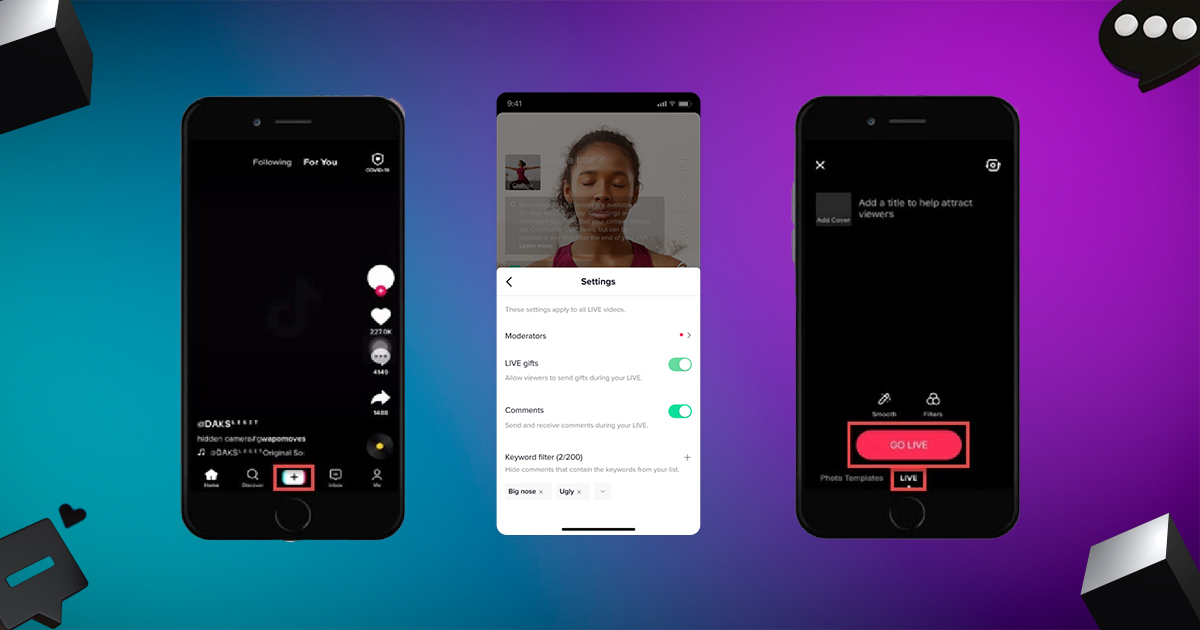
Step 1 – Open the TikTok Application
Launch TikTok on your smartphone and log into your account.
Step 2 – Tap the Create Button
Press the “+” icon located at the bottom center of the screen.
Step 3 – Switch to LIVE Mode
Swipe through the options under the record button until you find the LIVE tab.
Step 4 – Add an Engaging Live Title
A strong title attracts more viewers. Use descriptive and interesting titles such as:
- “Live Q&A Session”
- “Daily Tips and Tricks”
- “Behind the Scenes Live”
- “Ask Me Anything”
Step 5 – Adjust Live Settings
Before starting, we recommend setting up:
- Filters and effects
- Comment permissions
- Moderators
- Camera orientation
Step 6 – Tap “Go LIVE”
Once everything is ready, press the Go LIVE button and begin streaming.
How to Go Live on TikTok Without 1,000 Followers
Many users search for ways to bypass the follower requirement. We clarify that TikTok officially requires 1,000 followers to enable Live access.
Possible Alternatives
- Join another creator’s live as a guest
- Use TikTok Live Studio on PC if invited
- Focus on organic growth strategies
The safest and most reliable method is to grow followers through consistent content.
Related blog: How to go viral on TikTok
Best Times to Go Live on TikTok
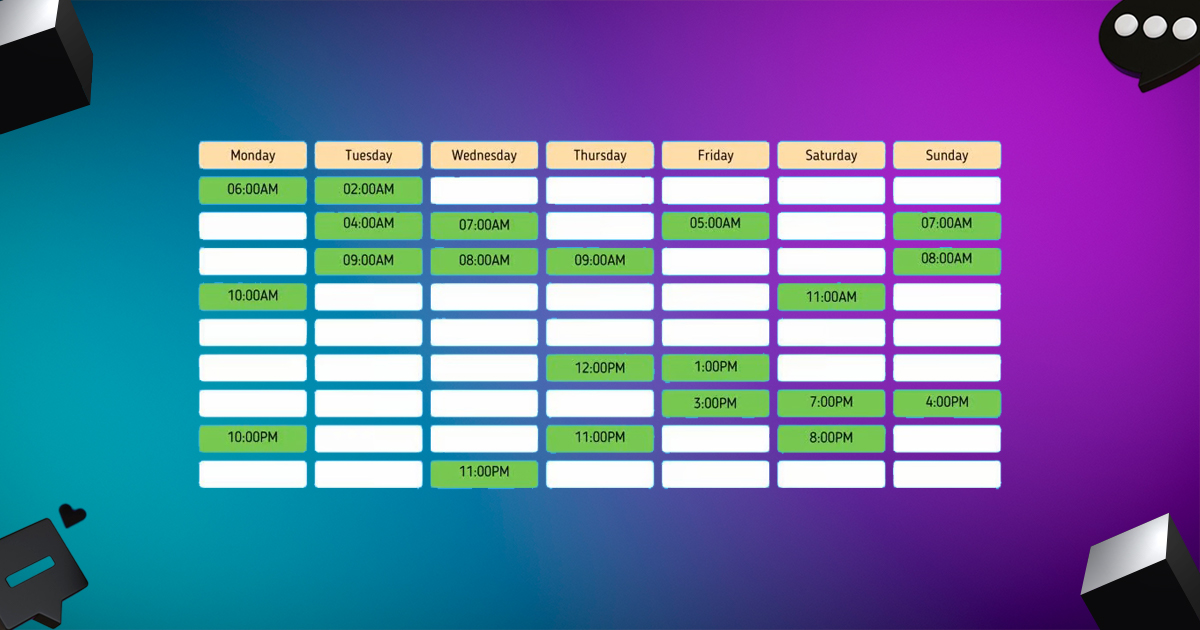
Timing plays a major role in live stream success.
We recommend analyzing audience activity and streaming during:
- Evenings between 6 PM and 10 PM
- Weekends when engagement is high
- Times when previous posts performed well
Related blog: Best time to post on tiktok
Using TikTok analytics helps identify the perfect time slots.
How to Use TikTok Live Studio on PC
TikTok also allows desktop live streaming through TikTok Live Studio.
Steps to Stream From a Computer
- Download TikTok Live Studio
- Log in with TikTok credentials
- Connect the camera and the microphone
- Set up scenes and overlays
- Click “Go Live” from the dashboard
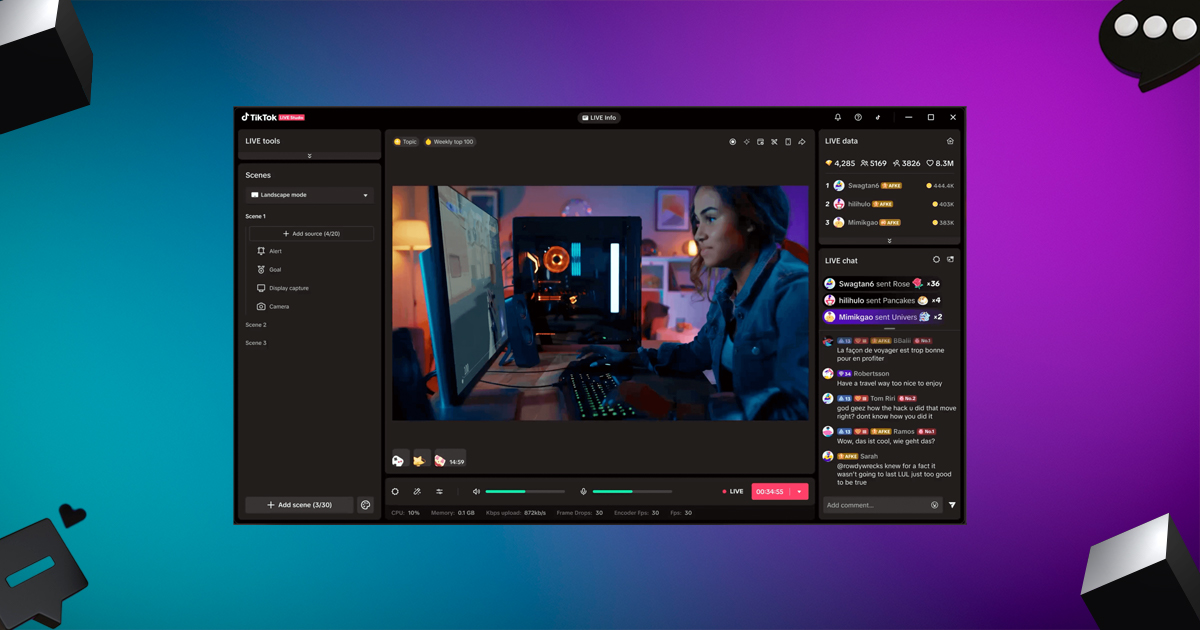
This option is ideal for gamers, educators, and professional creators.
Essential Tips for a Successful TikTok Live Stream
We follow proven strategies to ensure every live session performs well.
Prepare a Plan Before Going Live
Never start a stream without purpose. Decide:
- Topic of discussion
- Stream duration
- Goals of the session
Interact Actively With Viewers
Respond to comments, ask questions, and acknowledge viewers by name.
Use Good Lighting and Audio
Clear video and sound significantly improve watch time.
Promote the Live Stream in Advance
Post announcements and reminders before going live.
Stay Consistent
Regular live sessions help build loyal audiences.
How to Earn Money From TikTok Live
TikTok Live offers multiple monetization opportunities.
Virtual Gifts and Diamonds
Viewers can send virtual gifts, which convert into Diamonds. These Diamonds can be redeemed for real money.
Brand Collaborations
We see many creators using live sessions to promote products and services.
Affiliate Marketing
Creators can recommend products and earn commissions.
Common Problems and Fixes for TikTok Live
Live Option Not Showing
Possible reasons include:
- Less than 1,000 followers
- Outdated TikTok app
- Account restrictions
Poor Video Quality
Fix by ensuring:
- Stable internet connection
- Good lighting
- Updated device software
Banned From Going Live
Violating community guidelines may lead to temporary or permanent suspension.
Creative TikTok Live Ideas to Boost Engagement
We suggest these content ideas for engaging streams:
- Live tutorials
- Product demonstrations
- Q&A sessions
- Interviews
- Challenges
- Unboxing videos
- Educational lessons
Using creative formats keeps audiences returning.
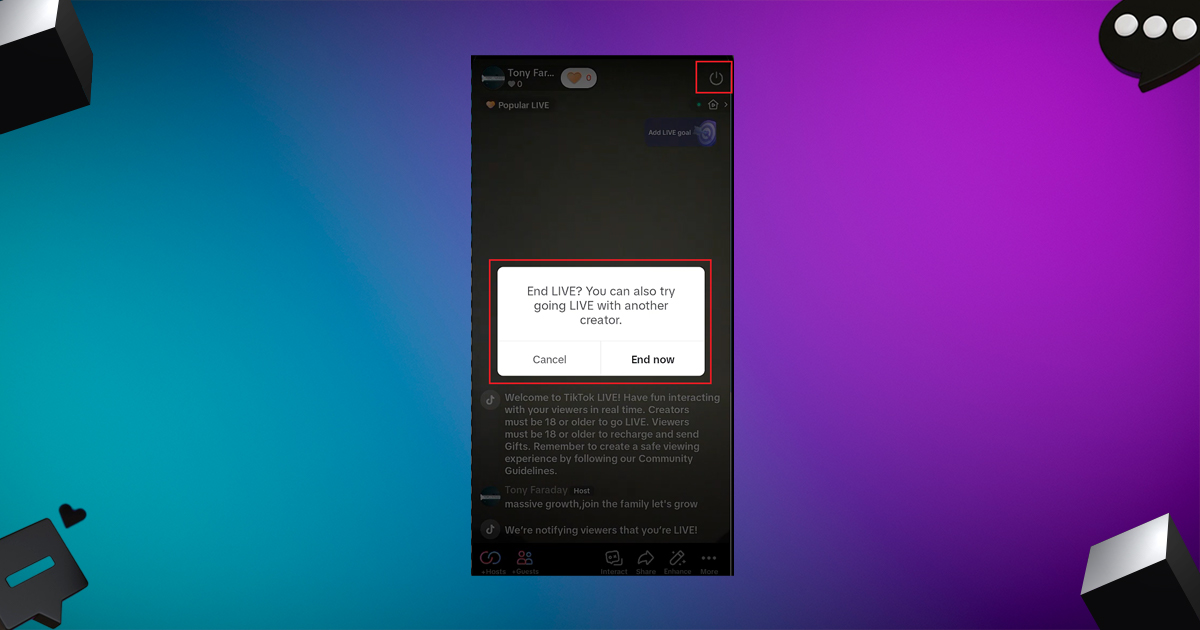
How to End a TikTok Live Stream Properly
When finishing the stream:
- Tap the X button
- Confirm to end
- Review live analytics
After every stream, analyze:
- Viewer count
- New followers
- Engagement levels
This data helps improve future performances.
Advanced Strategies to Grow Faster With TikTok Live
To maximize results, we recommend:
- Collaborating with other creators
- Hosting giveaways
- Using trending topics
- Streaming consistently
- Repurposing live content into short clips
These methods significantly increase reach and visibility.
TikTok Live Safety and Community Guidelines
We always follow TikTok rules to avoid penalties.
Avoid:
- Hate speech
- Copyrighted music
- Harmful content
- Misinformation
- Spam behavior
Maintaining compliance ensures long-term success.
Final Thoughts on How to Go Live on TikTok
We conclude that TikTok Live is a powerful feature for anyone serious about growing on the platform. By understanding the requirements, following the correct steps, and applying smart engagement strategies, any creator can build a strong presence.
Going live on TikTok is no longer optional—it is essential for modern digital success.
Start your first TikTok Live today and unlock new opportunities for growth and connection.




Leave A Comment