
Instagram Messages: How DMs Work, Privacy & Tips (2026)
Learn how Instagram messages work in 2026: send, edit, unsend, message requests, read receipts, privacy after encryption ended, and a business DM guide.
Kasthuri| 25 Nov 2026
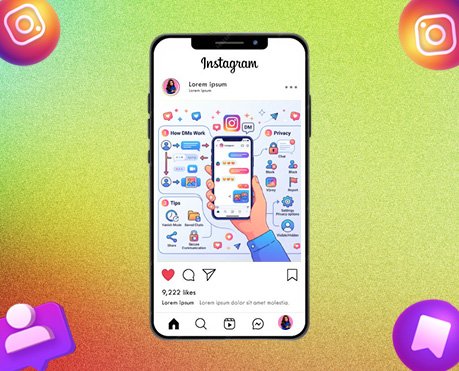
Quick answer: Instagram messages (also called Instagram Direct or DMs) are private chats on Instagram where you can send text, photos, videos, voice notes, Reels, posts, and links to one person or a group. You open them with the paper plane icon in the app or at instagram.com/direct/inbox on a computer. Messages from people you don’t follow land in Requests. You can edit a sent message for 15 minutes and unsend it at any time, but since 8 May 2026, Instagram DMs are no longer end-to-end encrypted, so use WhatsApp for sensitive chats.
Key takeaways
- Open your inbox with the paper plane icon on mobile, or at instagram.com/direct/inbox on desktop.
- Messages from accounts you don’t follow go to Requests, and filtered ones may be in Hidden Requests.
- You can edit a message within 15 minutes (up to 5 times) and unsend it whenever you like.
- Meta removed optional end-to-end encryption from Instagram DMs on 8 May 2026, so never send passwords, one-time codes, or financial details in a DM.
- For business, reply fast, use saved replies, follow Meta’s 24-hour messaging window if you use automation, and invite customers to message you from Stories, posts and ads.
Instagram messages are where most real conversations on the platform happen. People ask questions, book appointments, and buy products in the inbox, not in the comments. This guide explains how Instagram messages work, which features matter, what changed in 2026, and how businesses can handle DMs well. It’s written for both everyday users and small business owners.
If you’re growing a brand on Instagram, pair this guide with our Instagram SEO guide and our guide to selling products on Instagram.
What Are Instagram Messages?
Instagram messages are private conversations inside Instagram, between two people or a group. They are often called Instagram Direct or DMs (direct messages). Messages don’t appear on your feed, in search, or on your profile, and you can send text, photos, videos, Reels, and posts you find on Instagram (Instagram).
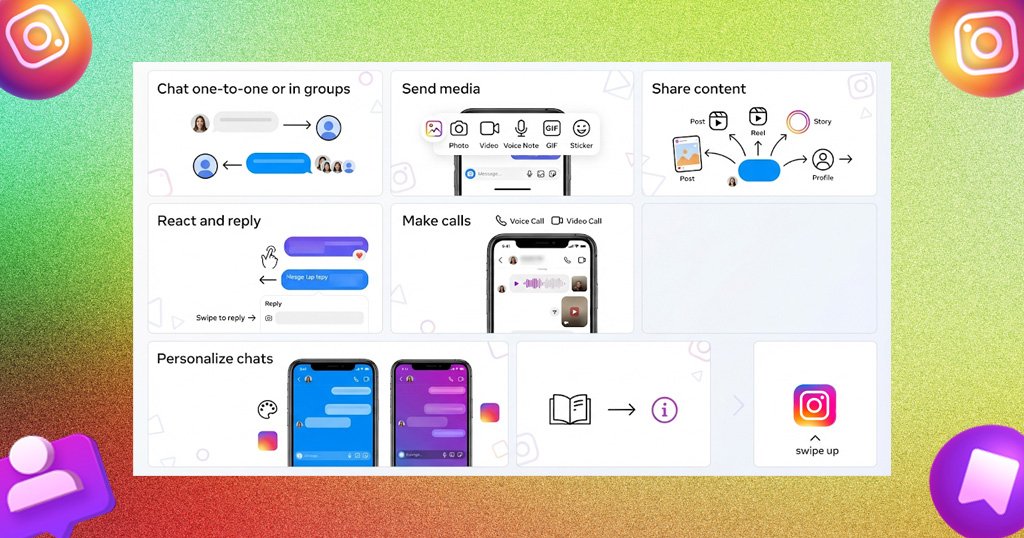
What you can do in Instagram messages:
- Chat one-to-one or in groups.
- Send media: photos, videos, voice notes, GIFs, and stickers.
- Share content: forward posts, Reels, Stories, and profiles to friends.
- React and reply: double-tap to react, or reply to a specific message.
- Make calls: start voice or video chats from a conversation.
- Personalize chats: change themes, which is why some chats look purple. See our guide on why an Instagram DM turns purple.
Professional accounts (business and creator) get extra inbox tools, covered in the business section below.
What Changed in 2026
The biggest change is that end-to-end encryption is gone from Instagram DMs. Here is what has changed recently:
| Date | Change | What it means for you |
|---|---|---|
| 8 May 2026 | Meta removed the optional end-to-end encrypted messaging feature on Instagram. Meta said very few people were opting in, and it recommends WhatsApp for end-to-end encrypted chats (MacRumors) | Meta can technically access DM content stored on its servers, so avoid sharing sensitive details |
| May 2026 onward | Chats that were encrypted were moved to standard storage, and users were given a way to download chats and media they wanted to keep (Notebookcheck) | Check that you saved anything important |
| 2024 | Edit sent messages for 15 minutes, pin up to three chats and turn read receipts on or off (Meta Newsroom) | Still the core of how DMs work today |
Everyday features such as threads, reactions, voice notes and media sharing continue to work as before.
How to Send and Check Instagram Messages
You can use Instagram messages on mobile and on desktop. Follow these steps.
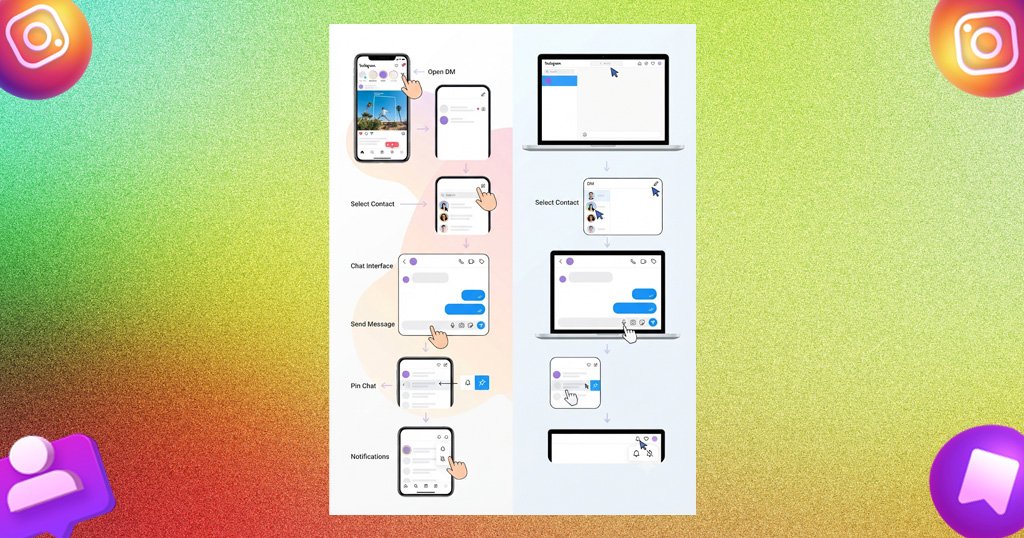
On the Instagram app (iPhone and Android)
- Open Instagram and tap the paper plane icon (Messages) in the top right, or swipe left from your feed.
- Tap the pencil or New message icon.
- Choose one person or several people.
- Type your message, or tap the camera, mic, GIF, or sticker icons.
- Tap Send.
On a computer
- Go to instagram.com and log in.
- Click Messages in the left menu, or go straight to instagram.com/direct/inbox.
- Click New message, choose the person, and click Chat.
- Type your message or attach a photo or video, then send.
Useful message settings
- Pin chats: Instagram lets you pin up to three chats to the top of your inbox.
- Read receipts: In Settings, open Messages and story replies to turn read receipts on or off for all chats, or change them per chat.
- Notifications: Control message alerts in Instagram’s notification settings and your phone settings.
- Mute a chat: Open the chat, tap the person’s name, and choose mute options.
Message Requests Explained
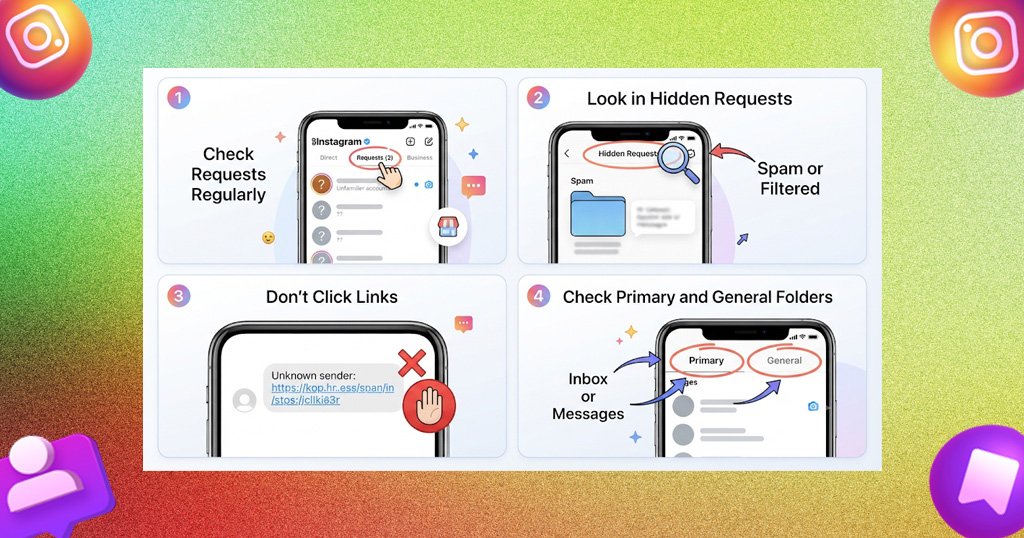
Message requests are Instagram’s way of separating messages from people you don’t follow. Messages from accounts you follow, or have chatted with before, go to your main inbox. Messages from everyone else land in a Requests folder, where you can accept, delete, or block the sender.
Tips for handling requests:
- Check Requests regularly if you run a business, because potential customers often message without following you first.
- Look in Hidden Requests if you’re missing a message, because Instagram can filter messages that look offensive or spammy.
- Don’t click links in requests from accounts you don’t know.
- Professional accounts may see an inbox split into Primary and General, with General tied to different notification defaults. If you expect customer messages, check both.
Edit, Unsend and Delete Messages
You can fix a typo within 15 minutes, and you can unsend a message whenever you change your mind. Here is how each option works:
| Action | What it does | Limits |
|---|---|---|
| Edit | Changes the text of a message you sent. The message shows an “Edited” label | Within 15 minutes, up to 5 edits, and messages containing mentions or commands can’t be edited |
| Unsend | Removes a message you sent from the chat for everyone | Only works on your own messages. The other person may already have seen it |
| Delete for you | Removes a message only from your own view | The other person still sees it |
| Delete chat | Removes a conversation from your inbox | The other person still keeps their copy |
Source: Meta Newsroom for the edit window and Instagram Help Center guidance as summarized by Linktree. Menus can change, so confirm in the app.
To edit: tap and hold the message, choose Edit, change the text, and send. To unsend: tap and hold the message, choose Unsend, and confirm.
Read Receipts, Vanish Mode and Screenshots
Read receipts show “Seen” when you open a message, and you can turn them off. You can switch them off for all chats or for specific ones. Turning them off also means you may not see when others have read your messages.
Vanish mode sends messages that disappear after they’ve been seen and the chat is closed. To use it, open a chat and swipe up. Messages sent before you turn it on aren’t deleted.
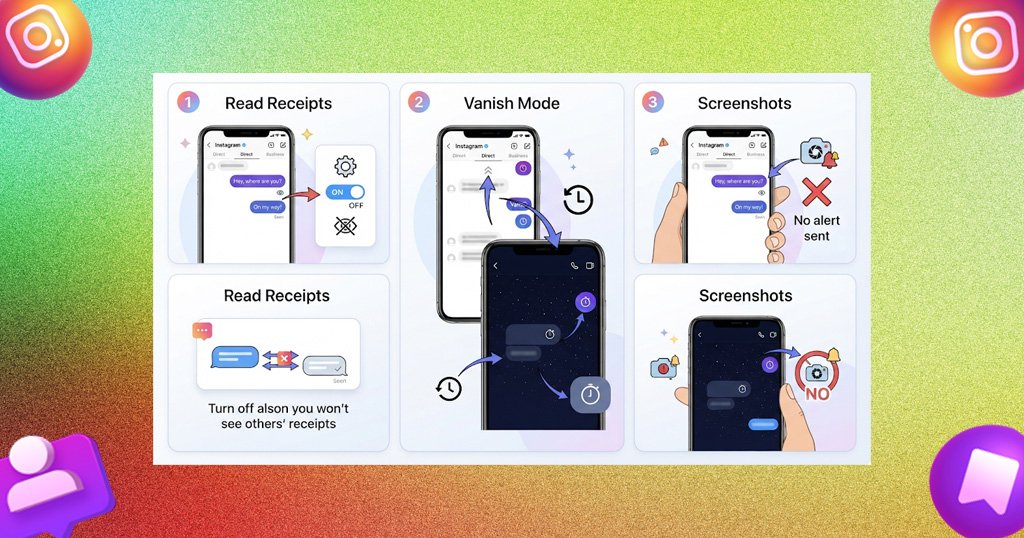
Screenshots: Instagram doesn’t alert the sender when you screenshot a standard chat, but it can alert them when you capture media sent in vanish mode. For more detail, see our guide on whether Instagram notifies you when someone screenshots.
Are Instagram Messages Private in 2026?
Instagram messages are private from other users, but they are no longer end-to-end encrypted. That means only you and the people in the chat can see them on Instagram, but Meta can technically access message content on its servers, as with most non-end-to-end encrypted messaging services.
| Question | Answer in 2026 |
|---|---|
| Can other users see my DMs? | No, messages don’t appear on your profile or feed |
| Are Instagram DMs end-to-end encrypted? | No. The optional feature ended on 8 May 2026 |
| Which Meta app still has end-to-end encryption? | WhatsApp, which Meta recommends for private chats |
| Are chat themes encrypted? | No. Meta says chat customizations such as themes aren’t end-to-end encrypted |
| Can the recipient screenshot or forward my message? | Yes, so only send what you’re comfortable sharing |
What to do:
- Never send passwords, one-time codes, card numbers, or ID documents in a DM.
- Use WhatsApp or another end-to-end encrypted app for sensitive conversations.
- Back up anything important by saving it outside Instagram.
- Review your privacy settings and who can message you.
Businesses should also review any tools that read or store DMs. Our guide to WhatsApp marketing for small business covers when moving a conversation to WhatsApp makes sense, with the customer’s consent.
Instagram Messages Not Showing or Sending: Fixes
Most message problems come from the Requests folder, app versions, or temporary limits. Try these fixes in order.
| Problem | What to try |
|---|---|
| I can’t find a message | Check Requests and Hidden Requests, then check you’re logged into the right account |
| Messages won’t send | Check your connection, update the app, and try again later in case you’ve hit a temporary limit |
| I can’t edit a message | You have only 15 minutes to edit, and messages with mentions or commands can’t be edited |
| I can’t unsend a message | You can only unsend messages you sent yourself |
| Messages disappear | The chat may be in vanish mode, or the sender unsent them |
| No message notifications | Check Instagram’s notification settings and your phone’s app notification settings |
| The chat looks purple | A chat theme is applied. See our guide on the purple Instagram DM |
| Someone I restricted is still messaging | Restricted accounts’ messages go to Requests. Learn how in our guide to restricting someone on Instagram |
If the app still misbehaves, restart it, log out and in, or reinstall it, and report the problem through Instagram’s Help Center.
Instagram Messages for Business (9 Steps)
For a business, Instagram messages are a sales and support channel, so treat them like one. Follow these steps in priority order.
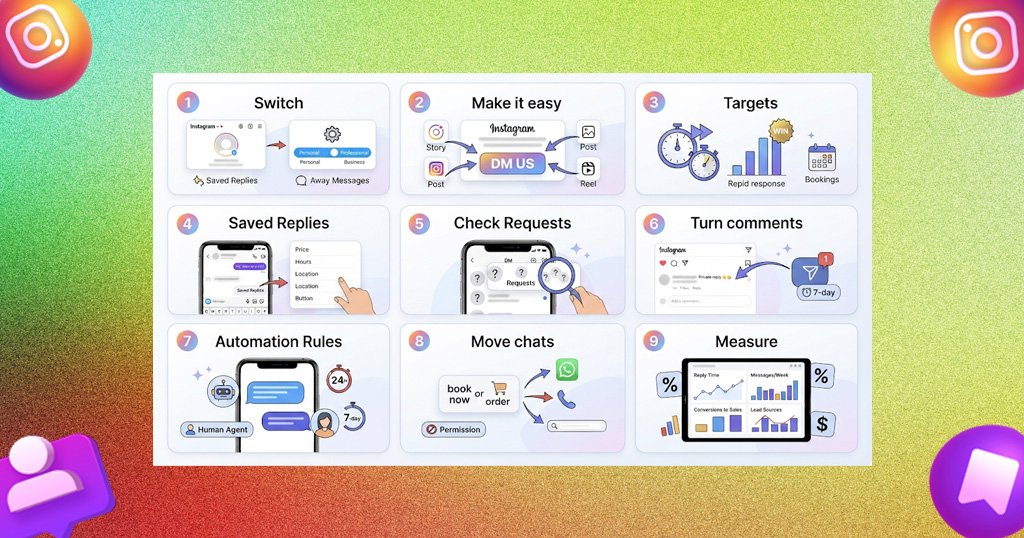
- Switch to a professional account. Business and creator accounts unlock inbox tools such as saved replies and away messages (availability varies by account and country). Learn more in Meta’s guide to the Instagram Inbox.
- Make it easy to message you. Add a clear “DM us” call to action in your bio, Stories, posts, and Reels. Our guide to Instagram SEO shows how to write bios that drive action.
- Set response targets. Aim to reply within an hour during business hours and within 24 hours at the latest. Fast replies win bookings.
- Use saved replies for common questions. Save short answers for price, hours, location, delivery, and booking, and personalize them before sending.
- Check Requests daily. New customers often arrive there first.
- Turn comments into conversations. Meta’s messaging API allows a business to send one private reply to a person who commented, within 7 days of the comment (Meta policy).
- Know the automation rules. If you use a tool that connects through Meta’s API, you can send replies within 24 hours of the customer’s last message, and a human agent can reply within 7 days using the Human Agent tag (Instagram Platform overview). Tell people when they’re chatting with an automated assistant, and don’t use the Human Agent tag for bots.
- Move high-intent chats to the right channel. For bookings and orders, ask permission to continue on WhatsApp, a phone call, or your website. See our social media lead generation tips.
- Measure your DM performance. Track reply time, messages per week, conversations that become bookings or sales, and where leads come from.
Simple DM conversion formula: DM-to-sale rate = sales from DM conversations ÷ number of DM conversations started. If 40 people message you and 6 buy, your DM-to-sale rate is 15%.
Don’t forget reputation. After a happy interaction, you can invite honest feedback with a neutral link, as explained in our guides on asking customers for reviews and responding to reviews. Never offer rewards for reviews.
8 Instagram DM Templates for Businesses
Short, warm, and specific beats long and robotic. Replace the brackets with your details.
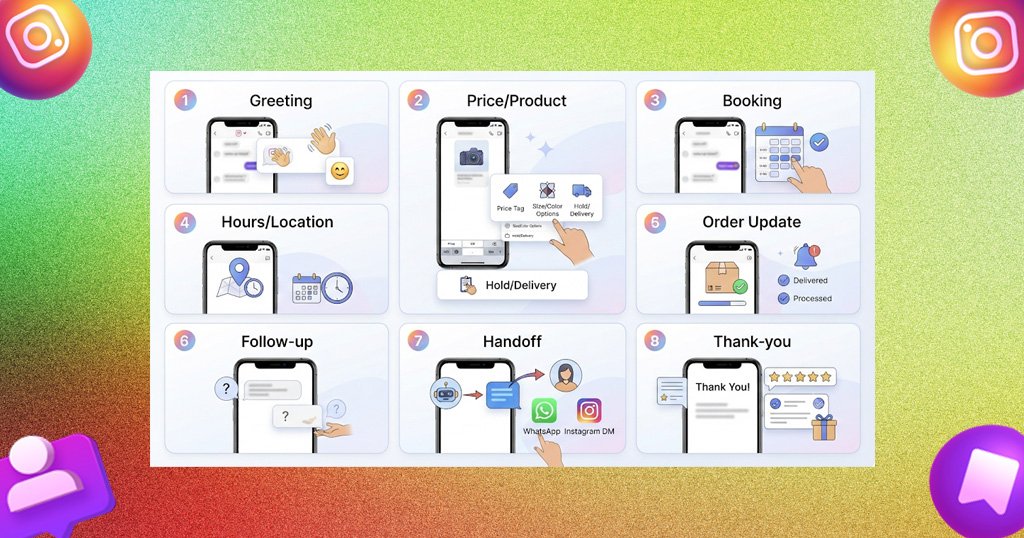
1. Greeting for new messages
Hi [Name], thanks for messaging [Business]! 😊 How can we help today?
2. Price or product enquiry
Thanks for asking about [product]. It’s [price] and available in [options]. Would you like me to hold one for you, or share delivery details?
3. Booking request
We’d love to see you! We have [time options] open this week. Which works best? I’ll confirm your booking as soon as you reply.
4. Opening hours and location
We’re at [address], open [days and hours]. Here’s the map: [link]. See you soon!
5. Order or service update
Hi [Name], quick update on your [order/service]: [status]. Let us know if you need anything else.
6. Gentle follow-up (within the messaging window)
Hi [Name], just checking whether you had any questions about [item or booking]. Happy to help whenever you’re ready.
7. Handing off to a human or another channel
I’d like to give you the best answer, so I’m passing this to [Name] on our team. Is it okay to continue on WhatsApp at [number], or would you prefer to stay here?
8. Thank-you after purchase
Thank you for choosing [Business], [Name]! If you have a moment, we’d value your honest feedback here: [review link].
Stay Safe: Spam, Scams and Unwanted Messages
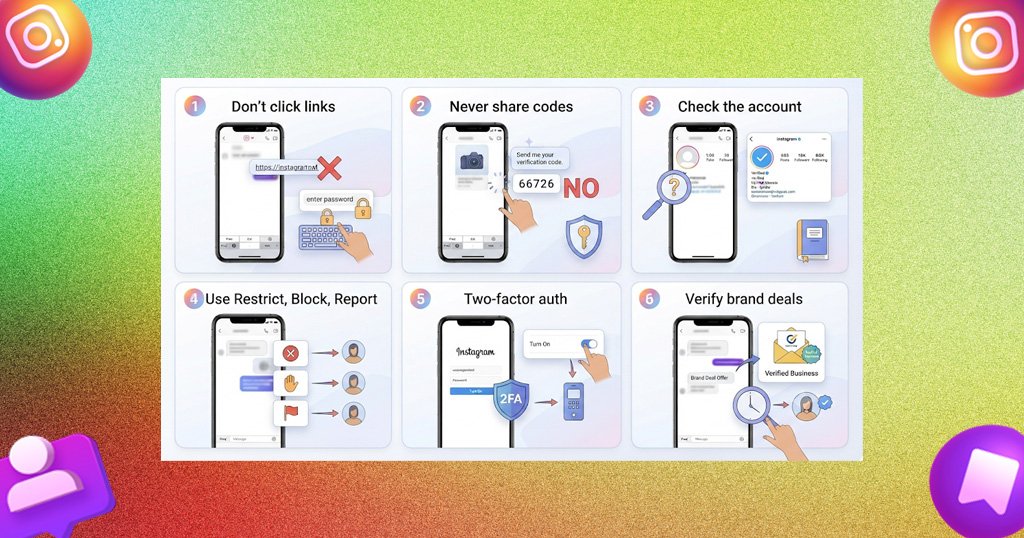
Treat unexpected messages with caution. Common red flags include new accounts, generic greetings, urgent offers, requests to click links or share codes, and promises of easy money or prizes.
- Don’t click unknown links or enter your Instagram password on any page except Instagram.
- Never share verification codes with anyone who messages you.
- Check the account. See our guide on how to spot fake Instagram accounts.
- Use Restrict, Block, and Report for unwanted contact. Our guide explains what happens when you restrict someone.
- Turn on two-factor authentication for your account.
- Verify brand deals. Check that “sponsor” offers come from real, verified business emails or accounts before you reply.
Myths vs Facts
| Myth | Fact |
|---|---|
| “Instagram DMs are end-to-end encrypted.” | Not anymore. Optional encryption ended on 8 May 2026 |
| “You can edit a message any time.” | Editing is limited to 15 minutes after sending |
| “Unsending means they never saw it.” | The other person may have already seen the message |
| “Turning off read receipts hides everything.” | It stops “Seen” labels, but people can still see that you sent or replied |
| “The 24-hour window applies to every DM I type.” | It applies to messaging sent through Meta’s API and automation tools, so check how your tool works |
| “Businesses can message anyone they like.” | Business messaging must follow Meta’s policies, and spammy outreach can lead to restrictions |
The Bottom Line
Instagram messages are simple to use but easy to mishandle. For personal use, remember that DMs are no longer end-to-end encrypted, so keep sensitive details out of them. For business, treat the inbox like a shop counter: answer fast, be helpful, follow Meta’s rules, and measure what turns into sales.
Storefries helps you drive people to your inbox with consistent content: social media scheduling for posts, Reels and Stories, plus review tools to build the trust that gets DMs started. Browse more guides on the Storefries blog.
FAQ
1. What are Instagram messages?
Instagram messages, also called Instagram Direct or DMs, are private chats on Instagram where you can send text, photos, videos, voice notes, Reels and posts to one person or a group. They don’t appear on your feed, in search, or on your profile.
2. Where are my Instagram messages?
Tap the paper plane icon at the top right of the Instagram app, or go to instagram.com/direct/inbox on a computer. Messages from people you don’t follow are in Requests, and filtered ones may be in Hidden Requests.
3. How do I send a message on Instagram?
Tap the paper plane icon, tap the New message (pencil) icon, choose a person or group, type your message, and tap Send. On a computer, click Messages, then New message, choose the person, and click Chat.
4. Can I edit an Instagram message after sending it?
Yes. You can edit a text message within 15 minutes of sending it, up to five times, and the message shows an “Edited” label. Messages that contain mentions or commands can’t be edited.
5. Can I unsend an Instagram message?
Yes. Tap and hold a message you sent, choose Unsend, and confirm. It’s removed for everyone in the chat, but the other person may already have seen it.
6. Are Instagram messages end-to-end encrypted?
No. Meta removed optional end-to-end encryption from Instagram DMs on 8 May 2026. Instagram DMs are still private from other users, but Meta can technically access message content. For end-to-end encrypted chats, Meta recommends WhatsApp.
7. What are Instagram message requests?
Message requests are messages from accounts you don’t follow. They go to a Requests folder where you can accept, delete, or block the sender. Check Hidden Requests as well if you’re missing a message.
8. Can I turn off read receipts on Instagram?
Yes. Open Settings, go to Messages and story replies, and turn off Show read receipts for all chats, or change the setting for a specific chat.
9. Can businesses use Instagram messages to get customers?
Yes. Switch to a professional account, reply quickly, use saved replies, invite people to “DM us” from your bio, Stories, and posts, and follow Meta’s messaging rules. Track how many conversations turn into bookings or sales.
10. What is the 24-hour messaging window on Instagram?
For businesses using Meta’s messaging API or automation tools, you can reply within 24 hours after a customer’s last message. A human agent can reply for up to 7 days using the Human Agent tag. Automated replies shouldn’t use that tag.
11. Do Instagram messages notify when someone screenshots?
Instagram doesn’t alert the sender when you screenshot a standard chat, but it can alert them when you capture media sent in vanish mode.
12. How do I stop unwanted Instagram messages?
Use Restrict, Block, and Report on the account, check who can message you in your privacy settings, and avoid clicking links from unknown senders. Our guide explains what happens when you restrict someone.



Leave A Comment