
Google Local Services Ads: Cost, Setup, Eligibility & Changes
How Google Local Services Ads work in 2026: eligibility, cost per lead, setup, the move to Google Ads, and what to do if LSAs aren’t in your country.
Kasthuri| 26 Oct 2026
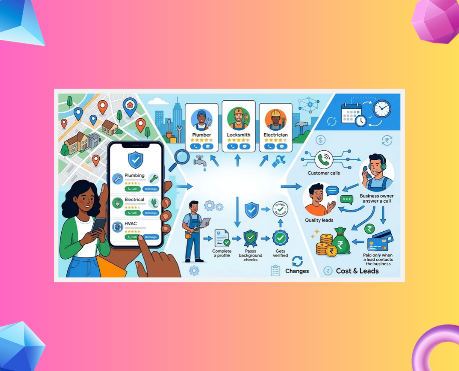
Quick answer: Google Local Services Ads (LSAs) are pay-per-lead ads that put verified local service businesses at the top of Google Search and Google Maps. You pay when a customer contacts you through the ad, for example by calling, messaging or booking, not when someone clicks. In 2026, Google is moving LSAs into Google Ads as Performance Max campaigns with pay-per-lead goals, and the ads are sold only in the US, Canada, the UK, Ireland, and a few European countries. India is not on Google’s list.
Key takeaways
- LSAs are pay-per-lead and keywordless. You choose service categories and areas, and Google matches your ad to searches.
- Google began migrating LSA accounts into Google Ads in August 2026. Reports from the old dashboard do not transfer, so export them first.
- Manual bidding is going away after migration, and some missed calls can now be billed.
- Your Google Business Profile, reviews, and response speed all influence how often you appear.
- Check your country and category in Google’s eligibility tool before you plan anything. If LSAs aren’t available, use the local alternatives in Section 11.
Google Local Services Ads are one of the fastest ways for a home or local service business to appear above regular results, but they are also one of the most misunderstood. The product has changed more in the last 12 months than in the previous five, so a lot of advice online is out of date. This guide covers how LSAs work, who can use them, what they cost, how to set them up, and what the 2026 changes mean for you.
If you’re building your wider local presence, start with our guides to verifying your Google Business Profile and local search marketing.
What Are Google Local Services Ads?
Google Local Services Ads are lead-generation ads for eligible local service businesses, shown in the most prominent spot for local searches on Google Search and Maps. A typical ad shows your business name, rating, number of reviews, service area, hours, and a call or message button. Google describes the product as pay-per-lead, where you pay for customers rather than clicks (Google Local Services Ads).
Here is how they differ from the ads most people know:
- Pay per lead, not per click. A lead is a valid contact such as a call, message, or booking request.
- No keywords. You select service categories, job types, and service areas. Google decides which searches to match.
- Verification first. Eligible businesses go through screening before the ad runs, and can then show the Google Verified badge.
- Profile-driven. Your ad pulls ratings and reviews from your Google Business Profile.
What Changed in 2025 and 2026
The biggest change is that LSAs are moving into Google Ads. Here is the timeline of changes advertisers need to know:
| When | Change | What it means for you |
|---|---|---|
| October 2025 | Google replaced the Google Guaranteed and Google Screened badges with a single Google Verified badge and ended the money-back guarantee, as reported by trade publications | Don’t promise customers a “Google guarantee” |
| August 2026 | Google began migrating LSA accounts into Google Ads as Performance Max campaigns with pay-per-lead goals, starting with a limited group of US advertisers (Search Engine Journal) | Watch for your 14-day notice email |
| 1 October 2026 | Google began charging for some missed calls: a call during business hours can be billed if the caller stays on the line for more than 20 seconds, as reported by Search Engine Land | Fix call routing and staffing before you spend |
| Late 2026 to 2027 | Remaining US accounts migrate later in 2026, and non-US accounts and remaining categories follow in 2027 | Check your account for notices |
What stays the same after migration
Google says the new campaigns keep the same ad positions, run exclusively on Google Search and Google Maps, and that campaigns with pay-per-lead goals work differently from standard Performance Max campaigns (Google Ads Help). You still pay for valid leads, targeting stays keywordless, and your Google Verified status carries over.
What changes after migration
| Before | After |
|---|---|
| Average weekly budget | Average daily budget |
| Manual maximum cost-per-lead bidding available to some advertisers | Manual bidding no longer supported |
| Different Target CPA by service category | One campaign-level Target CPA across categories |
| Local Services Ads inbox and dashboard | Lead Manager inside Google Ads |
| Historical reports available in the old dashboard | Historical performance reports do not transfer |
| BBB callouts available | BBB callouts no longer supported |
| Business details edited in two places | Business name, address, and standard hours sync from your Google Business Profile |
Source: Google Ads Help and Search Engine Journal’s coverage of the migration. Lead history carries over, but performance reports do not, so download any reports you need for year-over-year comparisons before your migration date. Google also notes that new pay-per-lead campaigns cannot yet be created directly inside Google Ads, so new campaigns still start in the Local Services sign-up flow. Confirm the current process when you begin.
Are Local Services Ads Available in Your Country?
LSAs are sold in a short list of countries, and India is not one of them. Google’s eligibility screen lists Austria, Belgium, Canada, France, Germany, Ireland, Italy, Spain, Switzerland, the United Kingdom, and the United States (Google eligibility page). Google’s provider terms also reference the Netherlands (Google Local Services Help). Availability changes, and even inside supported countries, it depends on your category and area.
If you run a business in India, Australia, the UAE, or another market outside the list, you can’t buy LSAs for that location. If you manage marketing for a client whose business operates in a supported country, you can work on their account, but the business itself must be eligible and pass verification. Section 11 explains what to do when LSAs aren’t an option.
Who Is Eligible?
Eligibility depends on three things: country, service category, and location. Google groups US categories into broad areas such as home services, professional services, health care, auto care, beauty, food and beverage, learning, pet care, wellness, and other selected services. Google has also added more specific restaurant, automotive, and beauty categories in the US. Some categories are limited to certain states or pilot cities, so rely on the live tool, not a static list.
Check yours in three quick steps:
- Open Google’s Local Services Ads page and start the sign-up flow.
- Enter your business type, address, and service area.
- Review the categories offered. If your business isn’t listed, LSAs aren’t available for you yet.
Verification requirements
To run the ad, you must pass Google’s screening. The exact checks vary by category and country and can include a verified Google Business Profile, business registration, licenses, insurance, and background checks for owners or staff (Google verification requirements). Keep your documents current, because expired licenses or mismatched business details can stop an ad from serving.
The Google Verified badge
Eligible advertisers that complete the required checks can show the Google Verified badge. It tells customers the business has completed Google’s screening for that category (Google Help). It isn’t available in every category and isn’t a promised ranking boost.
How Much Do Local Services Ads Cost?
Google doesn’t publish a fixed price because the cost per lead depends on your category, location, lead type, and competition. You set a budget and pay for valid leads. A simple, practical way to judge whether LSAs can work for you is to calculate your break-even cost per lead:
Break-even cost per lead = average job value × gross margin × lead-to-job close rate
Example: If an average job is worth $400, your gross margin is 40%, and you close 30% of leads, then $400 × 0.40 × 0.30 = $48. Paying more than $48 per lead means you lose money on the average job, so your Target CPA must sit below that number.
What affects your cost
- Category and job type. Urgent, high-value jobs usually cost more per lead.
- City and competition. Dense markets are pricier.
- Lead type. Google’s documentation says message leads are typically priced lower than phone leads, though not always.
- Profile quality and response. Ratings, review count, photos, and response time influence both visibility and efficiency.
- Season and demand. Emergency repairs spike with weather and holidays.
Lead credits and refunds
Google’s systems assess leads when they arrive and reassess charged leads, and some low-quality leads may be credited, usually within about 30 days. Credits are not available for leads outside your selected area or job type, and some categories and regions are excluded (Google lead credit policy). That is why accurate service areas and job types matter. Don’t rely on credits to fix a bad setup.
Missed calls can now be billed
Since 1 October 2026, a call during business hours that you miss can become a paid lead if the caller stays on the line for more than 20 seconds, with qualifying follow-up contacts billed once within a 15-day window. Make sure your published hours match when someone actually answers the phone.
How Google Ranks Local Services Ads
Local Services Ads are ranked through an auction that considers your bid and your overall profile quality. According to Google’s documentation (Google Help), the main factors include:
- Responsiveness. Missing calls or ignoring messages can lower your ranking.
- Relevance. Google looks at the service requested, the time, the location, your selected services, and your business bio.
- Contact options. Turning on message and booking options (where available) gives customers more ways to reach you.
- Profile quality. Rating, review count, response time, photos, and completed verification checks all matter.
- Bid and budget. Your budget and bidding setup remain part of the auction.
Because your reviews come from your Google Business Profile, improving your profile helps both your ads and your organic local presence. Our guides on how Google reviews boost local SEO and how to ask for reviews show you how.
LSAs vs Google Ads vs Performance Max vs Local SEO
Use the right tool for the job. This table helps you decide:
| Local Services Ads | Google Search Ads | Standard Performance Max | Local SEO | |
|---|---|---|---|---|
| Pricing | Pay per valid lead | Pay per click | Pay per click or conversion | No ad cost, takes time |
| Targeting | Service categories and areas, no keywords | Keywords you choose | Google’s automation across channels | Your profile and website |
| Where it shows | Google Search and Maps | Search results | Search, Maps, YouTube, Display, Gmail and more | Maps and organic results |
| Verification | Required | Not required | Not required | Profile verification only |
| Best for | Eligible service businesses wanting calls and bookings | Businesses wanting keyword control and website traffic | Businesses wanting broad reach across Google | Long-term, low-cost visibility |
| Control | Low | High | Medium | Medium |
Most local businesses get the best results by combining them: keep your Business Profile strong, run LSAs if you’re eligible, and use search ads for services LSAs don’t cover. Our guides on ranking higher on Google Business Profile and local SEO for multi-location businesses cover the organic side.
How to Set Up Local Services Ads (11 Steps)
Follow these steps in order. The process is similar for new advertisers, though Google is changing where migrated accounts are managed, so confirm each screen as you go.
- Check eligibility. Confirm your country, category, and service area in Google’s sign-up tool.
- Verify your Google Business Profile. A verified profile is a prerequisite, and your hours, address, and categories should be accurate. See our Google Business Profile management guide.
- Create your Local Services account. New campaigns currently start in the Local Services sign-up flow. Check Google’s help pages for the latest process.
- Choose categories and job types. Select only services you want and can deliver. Be specific, and skip low-margin or poorly matched jobs.
- Complete verification. Submit licenses, insurance, and background-check details where required, and track your status.
- Set your service area and hours. Match your real staffing hours, because they affect when calls are billed.
- Write your business bio and add photos. Use real photos of your team and work. Avoid stock images and make your bio clear about what you do.
- Set budget and bidding. Before migration, you use a weekly budget and available bidding options. After migration, you use a daily budget and a campaign-level Target CPA. Use your break-even cost per lead from Section 5.
- Turn on messaging and booking where available. These options are limited to certain countries and categories, and booking requests can be paid leads.
- Test your lead flow. Call your lead-routing number, message the ad from another phone, and confirm someone answers during business hours.
- Monitor, give feedback, and refine. Review lead quality weekly, mark leads accurately, and adjust areas and job types if you see poor-fit contacts.
How to Handle Leads and Protect Your Budget
Fast, consistent follow-up turns paid leads into jobs. Because you pay per lead, every missed or mishandled contact is wasted spend.
Set these response targets and adapt them to your trade:
| Contact | Target |
|---|---|
| Phone call during business hours | Answer live; if missed, call back within 5 minutes |
| Message request | Reply within 15 minutes during business hours |
| After-hours call or message | Automatic acknowledgment, then a personal reply first thing next business day |
| Booking request | Confirm the same business day |
Make your phone line match your ad
- Publish only the hours when someone will actually pick up.
- Remove long menus and hold times that make callers hang up.
- Add overflow coverage or an answering service for busy periods.
- Review call recordings and lead statuses each week.
Measure what matters
Don’t judge LSAs by lead count alone. Track:
- Cost per lead = ad spend ÷ charged leads
- Cost per booked job = ad spend ÷ jobs booked from LSA leads
- Return on ad spend = revenue from those jobs ÷ ad spend
- Close rate = booked jobs ÷ leads
Feed these back into your Target CPA, and review them monthly.
Build trust with reviews
Every review helps your ad and your profile. Ask every customer for an honest review, share your direct review link, and respond to all reviews. Never offer rewards for reviews, because Google’s content policy prohibits incentives. Our guides on asking customers for reviews, getting your Google review link, responding to positive reviews, and handling bad reviews walk through each step.
Your Migration Checklist
Before your migration date
- Download every performance report you need for comparisons.
- Note your current budget, bidding setup, service categories, areas, ad schedule, and lead-routing number.
- Check that your Business Profile name, address, and hours are correct, because they will sync.
- Save your photos and callouts.
- Make sure the admin email on the account is monitored, because Google sends a notice about 14 days ahead and a reminder a week later.
After migration
- Verify the daily budget and campaign-level Target CPA.
- Confirm service categories, areas, ad schedule, and routing number.
- Replace any BBB callout with other callouts such as hours or specialties.
- Decide whether services with very different lead values need separate campaigns, weighing control against less data per campaign.
- Allow up to two weeks for performance to settle before making big changes.
- Use Lead Manager in Google Ads to review and respond to leads.
Be careful with calls and emails claiming to be from Google. Confirm any request inside your Google Ads or Local Services account.
If LSAs Aren’t Available: An 8-Step Local Plan
If you’re in India or another market outside Google’s list, you can still win local leads without LSAs. Follow these steps in priority order:
- Complete your Google Business Profile. Add accurate categories, services, hours, photos, and a clear description. Our guide on adding your business to Google walks through the basics.
- Build a steady review routine. Reviews drive both clicks and trust. Use our review request scripts and track results with Storefries review tools.
- Fix your local SEO foundations. Keep your name, address, and phone number consistent, and follow our local SEO guide for small businesses.
- Track your map rankings. See where you appear, street by street, with a local rank checker or Storefries’ Local Heat Map.
- Run Google Search ads with call assets. Target your service area, add your phone number, and send callers to a dedicated service page.
- Use WhatsApp for fast replies. Add a WhatsApp button to your profile and website. See our WhatsApp marketing guide.
- Use Meta ads for local reach. Run small-radius campaigns on Facebook and Instagram with a clear call or message button.
- Prepare for AI search. More customers now ask AI tools who to hire, so keep your profile, website, and listings accurate. Read our guide on getting recommended by ChatGPT and Google AI.
For a wider plan, see our guide to getting more customers for a small business.
Common Mistakes
- Assuming LSAs are available everywhere. Check your country and category first.
- Ignoring break-even math. Set Target CPA from your margin and close rate, not from a guess.
- Publishing hours you can’t staff. Missed calls during listed hours can now be billed.
- Choosing too many job types. Broad selections bring poor-fit leads, and credits won’t fix them.
- Letting reviews slide. A weak or dated rating hurts your ranking and conversions.
- Skipping report backups. Historical reports don’t transfer to Google Ads.
- Stock photos and generic bios. Real photos and a clear bio build trust.
- Treating LSAs as a replacement for your profile. They depend on your Business Profile, so keep it accurate.
- Promising a Google guarantee. The old guarantee programs were replaced by the Google Verified badge.
FAQ
1. What are Google Local Services Ads?
Google Local Services Ads are pay-per-lead ads for eligible local service businesses. They appear at the top of Google Search and Maps with your rating, reviews, and a call or message button, and you pay when a customer contacts you through the ad.
2. How much do Google Localervices Ads Socst?
Google doesn’t publish a fixed price. You set a budget and pay per valid lead, and the cost varies by category, location, lead type, and competition. Work out your break-even cost per lead from your average job value, gross margin, and close rate before you start.
3. Are Google Local Services Ads available in India?
No. Google’s eligibility list covers the US, Canada, the UK, Ireland and several European countries, and India is not included. Indian businesses can use local SEO, Google Business Profile, Google Search ads, and WhatsApp instead.
4. Is Google Guaranteed still available?
No. In October 2025, Google replaced the Google Guaranteed and Google Screened badges with a single Google Verified badge, and the money-back guarantee program ended, according to trade reports. The badge shows that a business has completed Google’s required screening, and it isn’t available in every category.
5. Are Local Services Ads moving into Google Ads?
Yes. Google began migrating LSA accounts into Google Ads in August 2026 as Performance Max campaigns with pay-per-lead goals. Ads still run only on Google Search and Maps, billing stays pay-per-lead, and non-US accounts and remaining categories are scheduled for 2027.
6. How does Google rank Local Services Ads?
Google ranks them through an auction that considers your bid and overall profile quality. Documented factors include responsiveness, relevance to the search, contact options, rating and review count, photos, and completed verification checks.
7. Can I get a refund for bad leads?
Sometimes. Google assesses leads when they arrive and reassesses charged leads, and some low-quality leads may be credited, usually within about 30 days. Credits aren’t available for leads outside your selected area or job type, or for some categories and regions.
8. Will Google charge me for missed calls?
Since 1 October 2026, a missed call during business hours can become billable if the caller stays on the line for more than 20 seconds. Make sure your published hours match when your team answers the phone, and review call routing regularly.
9. Do Local Services Ads improve my organic local rankings?
Google doesn’t document a direct organic ranking boost from running LSAs. However, both rely on your Google Business Profile, so accurate details and genuine reviews support your ads and your organic visibility.
10. What should I do if Local Services Ads aren’t available in my country?
Focus on a complete Google Business Profile, a steady flow of genuine reviews, strong local SEO, Google Search ads with call assets, and fast messaging through WhatsApp or Meta. Track your map rankings monthly and adjust.
The Bottom Line
Local Services Ads can be a strong source of ready-to-book customers for eligible businesses, but they reward preparation: a verified profile, strong reviews, fast call handling, and a Target CPA based on real numbers. If LSAs aren’t available where you operate, the same fundamentals still win local searches.
Storefries helps you keep those fundamentals in shape: review monitoring and requests, local rank tracking, local SEO, and social media scheduling from one dashboard. Browse more guides on the Storefries blog.
Boost Your Social Media with Automation. Start Your Free Trial Today! Streamline your social media game with Storefries to create, publish, analyze, engage, and collaborate, all in one place. Get started for free



Leave A Comment